


Most recordings are messier than they need to be: a long pause at the start, a rambling intro before the real content begins, a few extra seconds of dead air at the end. The fastest fix is usually to cut audio online instead of opening a full editing suite. In 2026, more people are recording podcasts, saving lectures, creating short videos, producing AI voiceovers, and sharing quick voice notes than ever before. Most of them do not need a complicated studio workflow. They simply want to cut audio online, remove silence, shorten a recording, extract a clean clip, or trim a file before posting it.
That is why learning how to cut audio online is useful for creators, students, marketers, teachers, podcasters, musicians, and everyday users. Instead of opening desktop software, you can use an online audio cutter to upload a file, select the part you want, preview the result, and export a clean clip in minutes. Once you know how to cut audio online, the rest of your editing routine gets a lot lighter.
This guide explains how to cut audio online free with Audio Cutter AI, what file types you can edit, when an online audio cutting tool makes sense, and how to avoid common editing mistakes. Whether you want to cut MP3 online, cut WAV online, trim audio online, or cut audio recording online, this step-by-step guide will help you finish the job faster.
Why Cut Audio Online Instead of Using Editing Software?
The biggest reason to cut audio online is speed. Traditional audio editing software can be powerful, but it often takes time to install, configure, and learn. If all you need is a simple cut, that extra setup becomes unnecessary. A browser-based online audio cutter is usually faster for quick edits, which is exactly why so many people now choose to cut audio online instead of opening a full production suite.
When you cut audio online, you do not need to download a desktop app, create a complex project, or study a timeline full of advanced controls. You can open the tool, upload your file, choose the section you want to keep, and export the result. For many everyday tasks, that is enough.
This is especially helpful when you are working with simple content. A podcaster may need a short teaser. A student may need to trim audio online from a lecture recording. A social media manager may need a cleaner sound bite. A music hobbyist may want to cut a short sample. In these cases, an online audio cutting tool saves time because it focuses on the exact task: cut audio online free without unnecessary steps.
Desktop software still has a place. It is better for multitrack mixing, advanced mastering, detailed noise reduction, and professional production. But if your goal is to cut audio online, cut MP3 online, or remove a section from a WAV file, a simple online audio cutter is usually the better fit. Most everyday tasks simply do not need anything more than a quick way to cut audio online.
| Need | Online Audio Cutter | Desktop Audio Software |
| Quick trimming | Best fit | Slower setup |
| Beginner use | Easy | Often complex |
| Installation | Not required | Required |
| Advanced mixing | Limited | Better |
| Everyday audio cuts | Ideal | Often unnecessary |
In short, cut audio online when the task is simple, the deadline is close, and you want a clean result without learning professional editing software. When speed matters more than depth, cut audio online and keep moving.
What Can You Cut with an Online Audio Cutter?
A good free online audio cutter should support the most common editing needs, from short social clips to long voice recordings. Before you choose a tool, it helps to know what types of audio you may want to cut audio online for, and which formats it should handle well when you cut audio online most often.
MP3 and WAV Files
MP3 and WAV are two of the most common audio formats. MP3 is widely used for podcasts, music clips, voice notes, social media audio, and shared files because it is smaller and easier to distribute. WAV is often used for higher-quality recordings, voiceovers, interviews, and editing workflows.
If you want to cut MP3 online, you probably need a fast way to remove unwanted parts without converting the file first. If you want to cut WAV online, you may care more about preserving quality while you cut audio online. A good online audio cutter should make both workflows simple.
With Audio Cutter AI, you can cut audio online and work with popular formats such as MP3, WAV, FLAC, M4A, AAC, and other common audio files. That flexibility matters because not every recording comes in the same format. You may receive a WAV from a recorder, an MP3 from a podcast platform, or an M4A from a phone.
Podcasts, Interviews, and Long Recordings
Long recordings often contain useful moments hidden between silence, introductions, repeated points, or off-topic discussion. If you record podcasts, interviews, meetings, classes, or voice memos, you may need to cut audio recording online so the final file is easier to review, share, or repurpose.
For example, a 60-minute interview may contain a 90-second insight that would work perfectly as a promotional clip. A lecture recording may include ten minutes of setup before the actual lesson begins. A meeting recording may have a useful action-item section that you want to save separately. In each case, the ability to cut audio online helps turn long content into usable clips, and doing it quickly matters just as much as doing it well.
Long-form creators who cut audio online regularly often build entire content calendars around a handful of standout moments pulled from raw recordings.
Music Clips and Ringtones
Many users also search for audio cut online because they want to shorten music, create a preview, extract a chorus, or make a ringtone-style clip. In these cases, timing matters. Cutting too early can make the clip feel abrupt, while cutting too late can include unwanted sound.
An online audio trimmer makes this easier because you can adjust the beginning and ending points, preview the result, and export only the section you need. If your goal is simple music cutting, you do not need a full digital audio workstation. You just need to cut audio online with accurate start and end controls, since most ringtone-style clips take only a minute or two to prepare once you cut audio online.
Social Media and Video Audio
Short-form content has made audio editing more important. Creators often need short, clean clips for Reels, Shorts, TikTok-style videos, product demos, ads, tutorials, and voiceovers. A long voice recording is rarely ready to publish as-is. It usually needs trimming.
This is another reason people search for how to cut audio online. They want a fast workflow that turns rough audio into something usable for content. If you are editing social clips, an online audio cutter can help you remove dead space, tighten pacing, and create a more polished sound before you upload or combine the audio with video. Creators who post daily tend to cut audio online as a routine part of their editing checklist rather than a one-off task.
How to Cut Audio Online Free with Audio Cutter AI
Now let's walk through the actual process. If you want to cut audio online free, Audio Cutter AI gives you a simple browser-based workflow. You can start without downloading software, and the process is designed for users who want quick results rather than complex controls.
Step 1: Open Audio Cutter AI
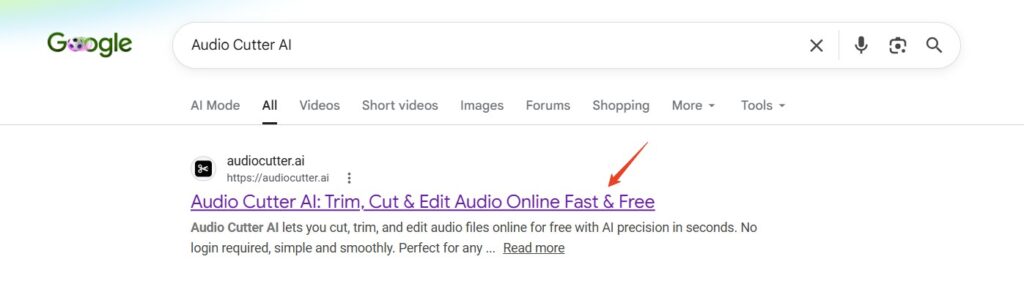
The first step is to open Audio Cutter AI in your browser. Because it is an online audio cutting tool, you do not need to install a desktop editor before you begin. This is useful when you are using a shared computer, working from a laptop, or editing on a device where you do not want to add new software.
If your goal is to cut audio online free, this browser-based approach keeps the process simple. You can start from the upload area and move straight into editing, without ever leaving the browser tab to cut audio online.
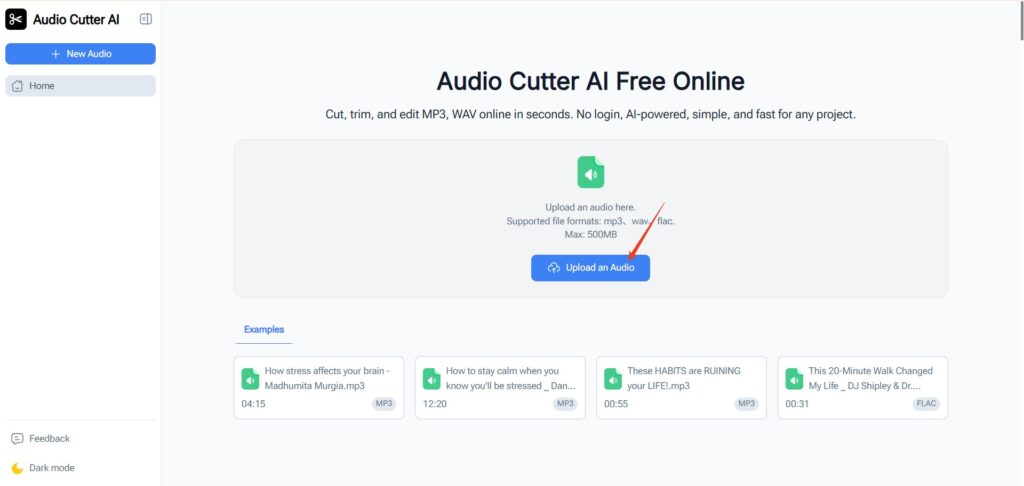
Step 2: Upload Your Audio File
Next, upload the audio file you want to edit. Audio Cutter AI supports popular audio formats such as MP3, WAV, FLAC, M4A, and AAC, so you can work with common files from phones, recorders, podcast tools, music libraries, or other apps.
This step is important because different users arrive with different needs. One person may want to cut MP3 online for a podcast teaser. Another may want to cut WAV online from a high-quality voice recording. Someone else may want to trim audio online from an M4A voice memo. A flexible online audio cutter helps all of these users follow the same simple workflow to cut audio online.
Audio Cutter AI also supports files up to 500MB, which is useful for longer recordings. For many everyday editing tasks, that is enough to handle podcasts, lessons, voice recordings, interviews, and music files. Once the file is in, you are only a few clicks away from being able to cut audio online and move to the next step.
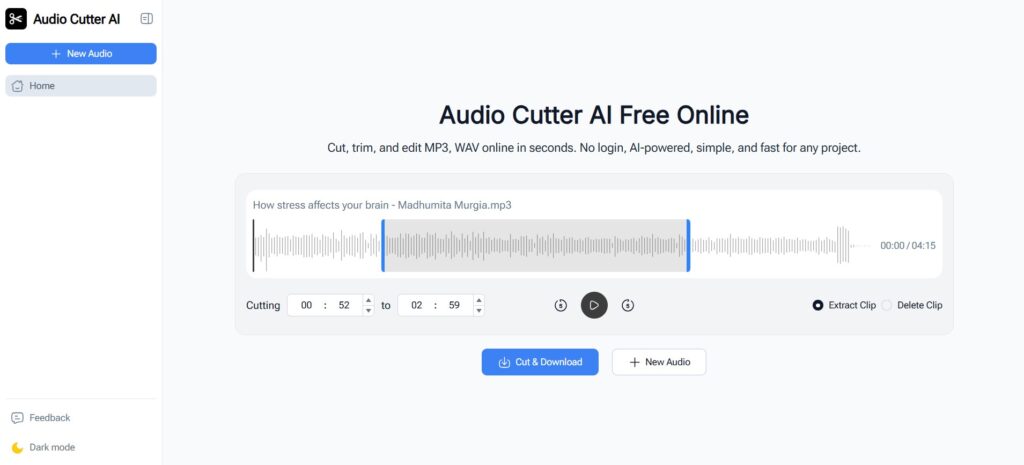
Step 3: Choose the Section You Want to Keep
After uploading your file, choose the section you want to keep. This is the core of how to cut audio online. You can move the start and end points to define the part of the file you want in the final clip.
For example, you may want to remove the first five seconds of silence, cut out a mistake near the end, shorten a podcast introduction, or extract a single useful section from a longer recording. When you cut audio online, focus on the final listening experience. The clip should start naturally, keep the important content, and end without feeling sudden.
If you are trimming speech, avoid cutting too close to the first word. If you are trimming music, pay attention to rhythm and transitions. If you are editing social media audio, keep the strongest moment near the beginning. This step is really the heart of learning to cut audio online well rather than just quickly.
Step 4: Preview the Cut Before Exporting
Before exporting, preview the result. This small step can prevent many common mistakes. Listen to the beginning, the ending, and any important transition. Make sure you have not cut off the first syllable of speech or the final note of music.
Previewing is especially important when you cut audio online for podcasts, lessons, ads, voiceovers, or social clips. A clip may look correct on the timeline, but the sound may still feel too abrupt. If needed, adjust the start or end point and preview again.
The goal is not just to cut audio online fast. The goal is to create a clean, natural clip that sounds ready to use.
Step 5: Export the Finished Audio Clip
Once the preview sounds right, export the finished clip. You can then use the new audio file in your podcast workflow, social media post, lesson material, music draft, voice message, or content project.
This is where an online audio cutter becomes practical. You do not need to save a large editing project or manage complicated export settings for a simple task. You cut audio online, preview it, export it, and move on. That is really the whole point of choosing to cut audio online in the first place.
Try Audio Cutter AI when you need a simple way to cut audio online free without sign-ups, downloads, or complicated editing software.
Tips for Cleaner Audio Cuts
Cutting audio is simple, but clean results still require a little judgment. These tips can help you get better clips whenever you cut audio online.
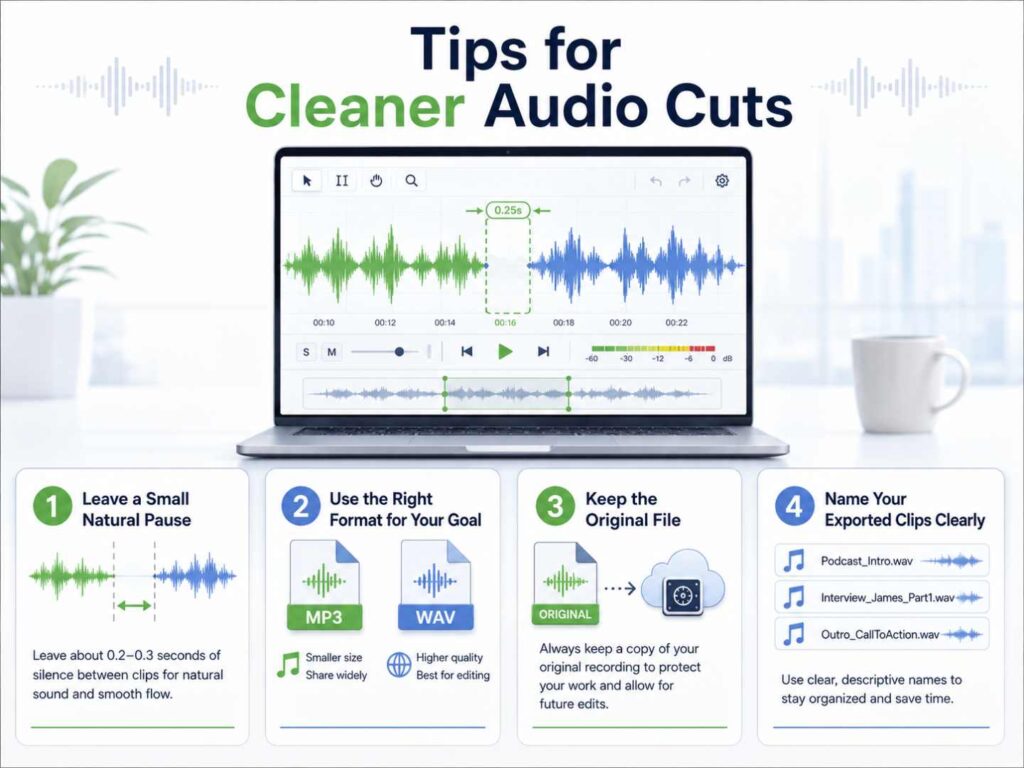
Leave a Small Natural Pause
One common mistake is cutting too tightly. If a clip starts immediately on a word or beat, it can feel harsh. Leaving a tiny natural pause at the beginning often makes speech sound more comfortable and music feel less abrupt.
This is especially useful when you trim audio online for voiceovers, podcasts, or educational recordings. A short pause gives the listener a moment to settle before the main sound begins.
Use the Right Format for Your Goal
Choose your format based on how you plan to use the clip. MP3 is usually good for sharing, social media, podcasts, and general use because it keeps file sizes manageable. WAV is better when quality matters or when you plan to use the clip in another editing workflow. FLAC can be useful when you want compression while preserving more audio quality.
If you simply want to cut MP3 online and share the result quickly, MP3 is practical. If you need to cut WAV online for a professional voice recording, keeping the quality may be more important. Either way, the fastest path is still to cut audio online first and worry about format second.
Keep the Original File
Always keep a copy of the original file. When you cut audio online, the exported clip is usually a shorter version of the source. If you later realize you need a different section, the original file lets you return and make another cut.
This is especially helpful for interviews, music recordings, course materials, and long voice memos, since you may want to cut audio online a second time from the same source later, or cut audio online in a different way once your plans for the clip change.
Name Your Exported Clips Clearly
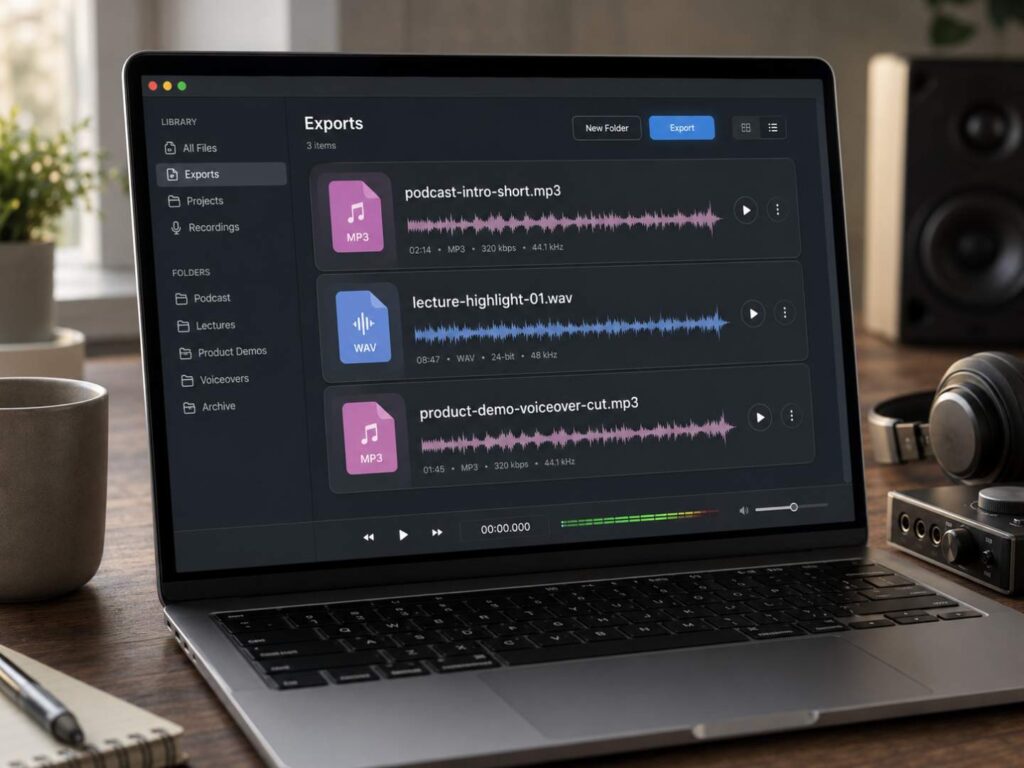
Clear filenames save time later. Instead of exporting files with vague names, use names that describe the content. For example:
- podcast-intro-short.mp3
- lecture-highlight-01.wav
- product-demo-voiceover-cut.mp3
This may seem simple, but it makes a big difference when you cut audio online often and build a library of clips.
When Should You Use an Online Audio Cutting Tool?
An online audio cutting tool is best when your editing goal is focused. Use one when you need to cut audio online, remove silence, shorten an MP3, extract a WAV section, or create a clip for quick use.
It is a good fit when you do not want to install software, do not need multitrack editing, and only want a simple browser-based workflow to cut audio online. It is also useful when you are working across different devices. You can use a browser on a laptop, desktop, or supported mobile environment without rebuilding a full editing setup.
An online audio cutter is especially helpful for:
- Podcast highlights
- Music snippets
- Voice notes
- Lecture recordings
- Interview clips
- Social media audio
- AI voiceover edits
- Quick MP3 and WAV trimming
However, an online tool is not always the right choice. If you need advanced noise reduction, complex sound design, multitrack mixing, mastering, or detailed restoration, desktop software may be better. The key is to choose the tool based on the task, and for most people the task is simply to cut audio online without friction.
For quick edits, cut audio online. For complex production, use professional software.
Why Audio Cutter AI Is Useful for Quick Online Audio Editing
Audio Cutter AI is designed for people who want to cut audio online without making the process complicated. It focuses on the core workflow: upload, select, preview, and export. That makes it useful for beginners, creators, students, and professionals who need a fast audio edit rather than a full studio environment.
The tool supports MP3, WAV, FLAC, M4A, AAC, and other common formats, so it works for many everyday audio files. It also supports files up to 500MB, which is helpful for longer recordings such as podcasts, interviews, classes, and voice memos.
Another advantage is convenience. You can cut audio online free without signing up or downloading extra software. The browser-based workflow makes it easier to handle quick edits on different devices, whether you want to cut audio online from a phone or cut audio online from a laptop between meetings.
Audio Cutter AI is also useful for modern content workflows. If you create podcasts, music clips, social posts, AI voiceovers, training materials, or personal recordings, you often need small edits before the audio is ready. With an online audio cutter, you can trim the rough parts, keep the best section, and export a cleaner clip in seconds.
Its AI-powered precision is especially helpful for users who want cleaner results without learning advanced editing controls. Instead of overcomplicating the process, Audio Cutter AI keeps the experience focused: cut audio online, preview the result, and get a polished clip quickly. Whenever the goal is simply to cut audio online without extra steps, that focus is exactly what saves time.
Frequently Asked Questions About Cutting Audio Online
How can I cut audio online for free?
You can cut audio online free by using a browser-based tool such as Audio Cutter AI. Upload your file, select the part you want to keep, preview the result, and export the finished clip. This works just as well for a quick MP3 or WAV as it does for a longer file, so you can cut audio recording online — a podcast, an interview, a meeting, a voice memo — without paying for software or installing anything.
Can I cut MP3 or WAV files online?
Yes. You can cut MP3 online or cut WAV online with an online audio cutter, as long as the tool supports both formats. MP3 works well for podcasts, voice notes, and social media audio, while WAV is the better choice for high-quality recordings, voiceovers, and interviews. Either way, you cut audio online the same way — upload, select, preview, export — without installing desktop software.
What is the difference between cutting and trimming audio?
Cutting audio usually means removing or extracting a section from an audio file. Trimming audio usually means shortening the beginning or end. In everyday use, people often use both terms when they search for how to cut audio online or trim audio online.
Do I need an account to cut audio online?
With Audio Cutter AI, you can start editing without creating an account. That makes it easier to cut audio online when you only need a quick edit and do not want to go through a sign-up process.
Conclusion
Learning how to cut audio online is one of the easiest ways to make everyday audio more useful. You do not need advanced editing software to remove silence, shorten a recording, create a podcast highlight, trim music, or prepare a social media clip. For many users, a simple online audio cutter is enough, and the habit of choosing to cut audio online first tends to save real time every week.
If you want to cut audio online free in 2026, Audio Cutter AI gives you a fast browser-based workflow for MP3, WAV, podcasts, music, voice recordings, and social clips. Open the tool, upload your file, choose the section you want, preview the result, and export a clean clip. It is a simple way to cut audio online without sign-ups, downloads, or complicated editing software, and once you try it, you may find yourself coming back to cut audio online every time a new recording needs a trim.